Every bed has an address
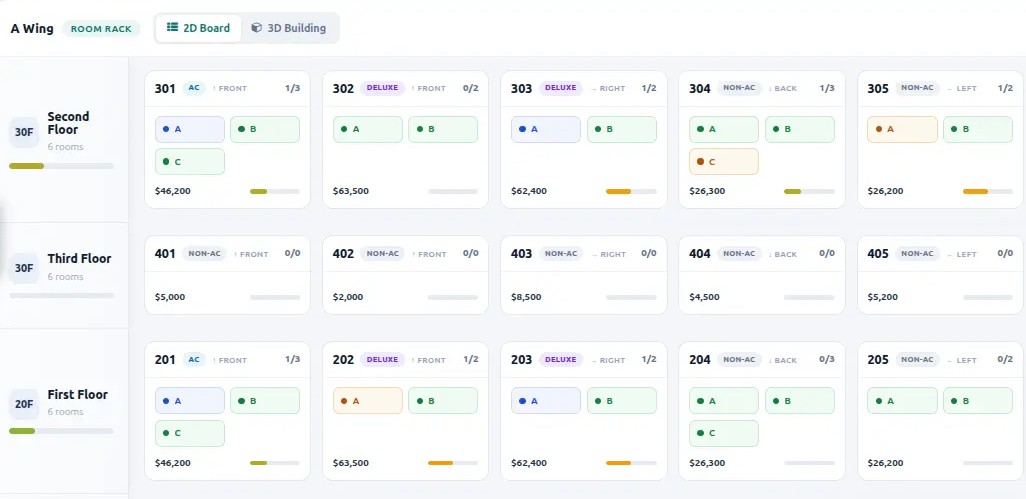
Hostels are organised as wing › floor › room › bed.
School ERP
Botspot School Management runs admissions, attendance, fees, exams and hostels in one place, without spreadsheets or registers.
Hostels are organised as wing › floor › room › bed.
Each window is a room. A warm glow means it is occupied.
Free, reserved and occupied beds in one view.
Paid facilities are priced per room, separate from the room fee.
One student, one bed. The hostel fee invoice is generated automatically.
School ERP
Botspot School Management is a school ERP application built by Botspot Infoware. It keeps enquiries, admissions, student records, attendance, timetables, exams, fees, library, transport, notices and hostel beds in one database, so every office works from the same student record.
Student admission workflow
A family's interest is logged with student and parent name, then tracked through contacted, visited and interested stages.
An interested enquiry is converted into an admission application. It moves through submitted, verified and approved stages.
Enrolling creates the parent and student records automatically. Aadhaar, APAAR ID, PEN and UDISE code are fields on every student record from day one.
Open the class attendance sheet for a date, mark each student present or absent on one list, then confirm. Present, absent and total counts are calculated automatically.
Load students from the active class and enter theory and practical marks per subject. Grades and pass or fail follow automatically.
Every fee invoice is linked to a journal entry, so the accounts team and the school office always see the same payment status.
A bed allocation links one student to one bed for a stay. Renewing creates a new allocation linked back to the previous one.
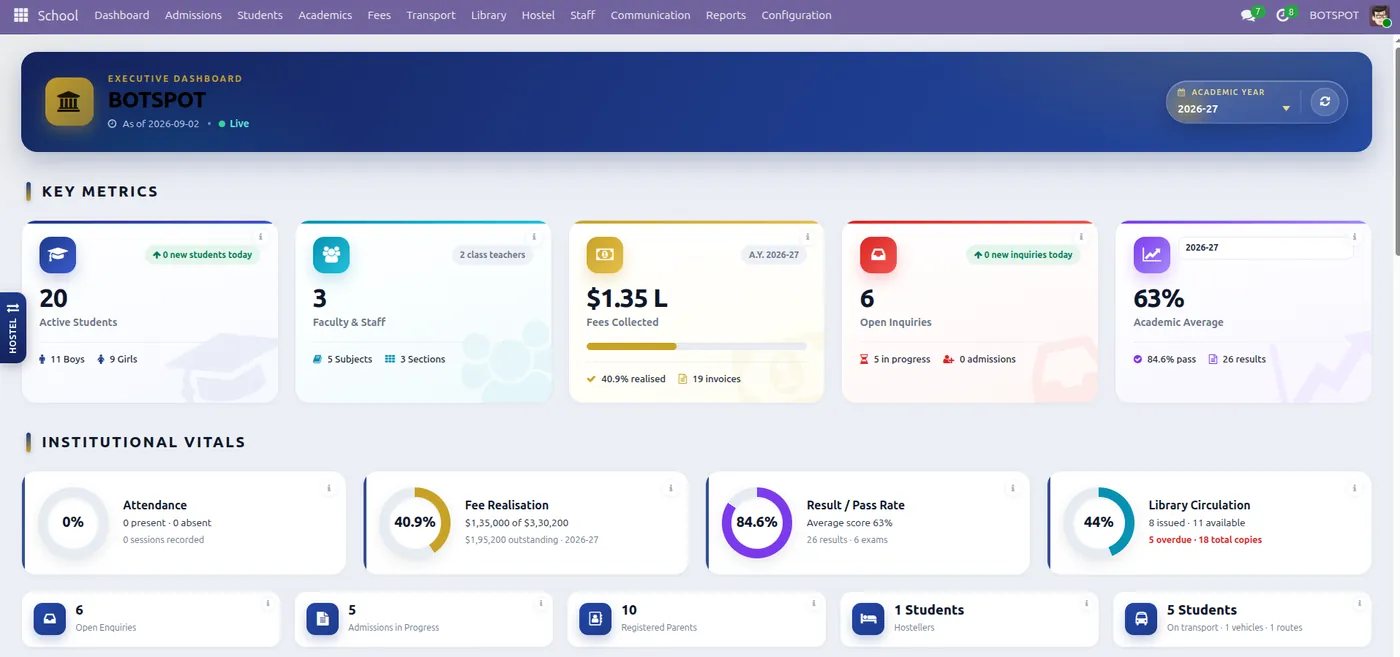
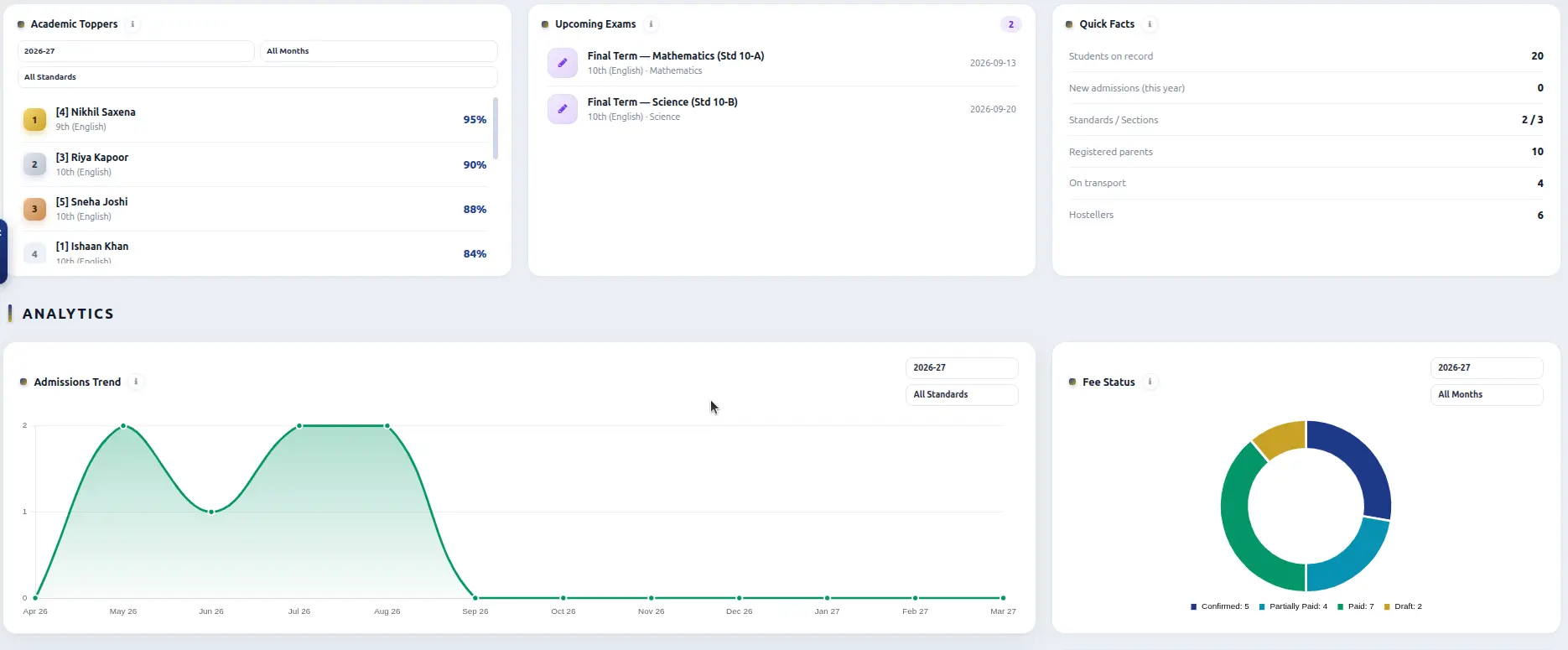
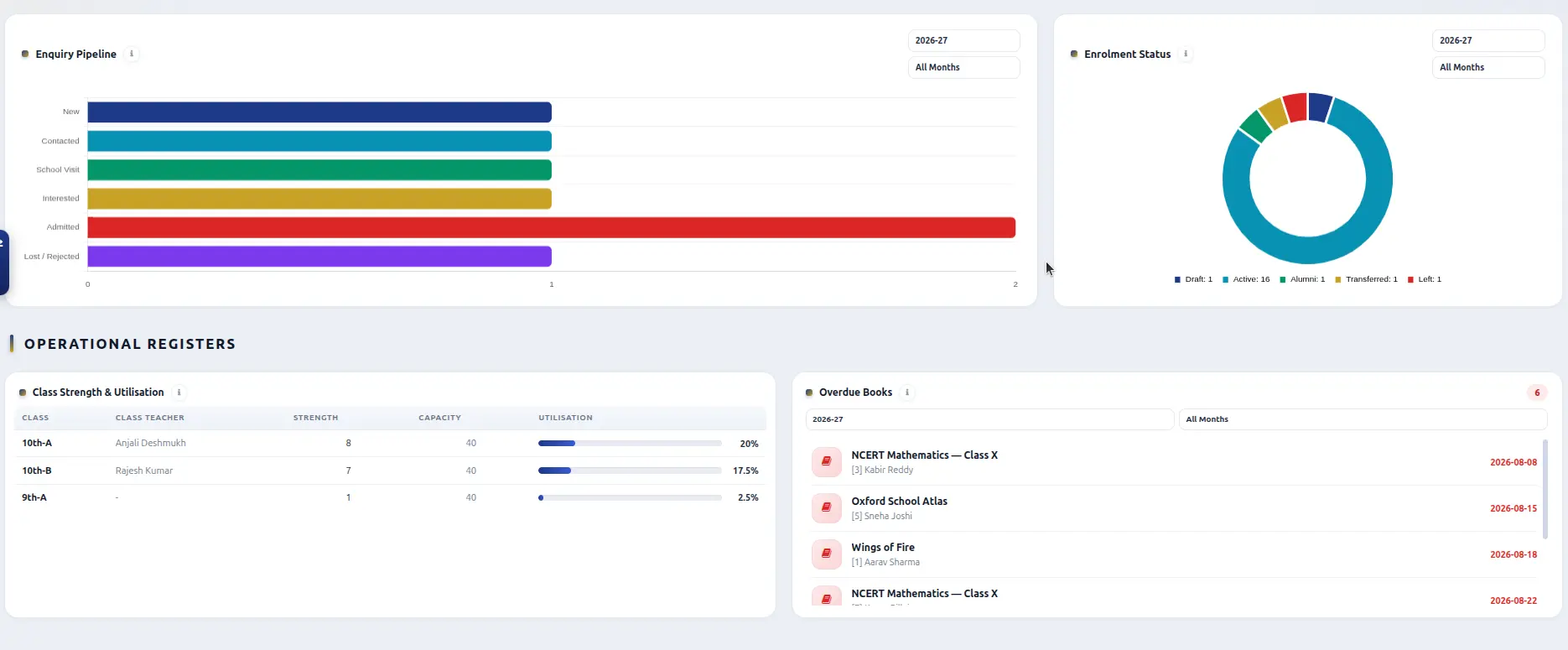
Academic toppers, class averages, the admissions and enquiry pipeline, fee-collection status, overdue library books and hostel occupancy on one screen.
Real product screens
2D room rackBed-level board with status colours and room fees.
School ERP modules
The records that teachers, class coordinators and the accounts office use every day.
Set school periods with start times, end times and recess once, then build each class weekly timetable by assigning a subject, teacher and room to every period across every weekday.
Link fee categories to accounting products, combine them into a fee structure with line items, and bill students as fee invoices that support paid, partially paid or confirmed status.
Catalogue books by category with total copy counts. Issuing a book reduces availability; returning or marking a copy lost updates the count again so library stock always stays current.
Record vehicles, drivers, attendants, routes and stops in one place, then mark any student as a transport user with a specific assigned route and pickup stop across the school.
A circular can be targeted by medium, standard or class and published with a mail template, so only the relevant students and parents are notified.
Each room can carry its own paid facilities, priced independently of the base room fee. Allocating a bed can automatically generate the matching hostel fee invoice.
Dashboard walkthrough
What school administrators ask first
Botspot School Management is a school ERP application built by Botspot Infoware. It keeps enquiries, admissions, student records, attendance, timetables, exams, fees, library, transport, notices and hostel beds in one database.
Yes. It includes a library catalogue with issue, return and lost-copy tracking, plus transport management for vehicles, routes, stops and student assignment.
Enquiries, admission applications, enrolment, student and parent records, daily attendance, timetables, examinations, fee structures and invoices, library, transport, notices and circulars, hostel bed allocation and a leadership dashboard.
Yes. Every fee invoice is linked to a journal entry in Accounting, so payments recorded in either place stay in sync automatically.
An enquiry is converted to an admission application, which moves through submitted, documents-verified and approved stages. Approving and enrolling the application automatically creates the linked parent and student records.
Yes. Hostels are organised into wings, floors, rooms and individual beds, each room can carry its own paid facilities, and every allocation follows a lifecycle from draft to allocated, renewed or vacated.
Yes. Student records capture Aadhaar number, APAAR ID, PEN and UDISE code alongside standard admission and academic details.
Yes. A KPI dashboard shows academic toppers, class averages, admission and enquiry pipelines, fee-collection status, overdue library books and hostel occupancy in one screen.
Talk to Botspot Infoware about a walkthrough of the Botspot School Management System, configured for your board, standards and fee structure.
Or write to us directly at contact@botspotinfoware.com